Avertissement
Lorsque vous utilisez cet instrument, veuillez ne pas regarder directement l'interface optique ni l'extrémité du conduit optique.
Ne regardez pas directement la fibre optique, pour éviter toute lésion oculaire ! À l'exception des longueurs d'onde 1 625 nm et 1 650 nm, tous les autres tests s'effectuent hors ligne.
longueur d'onde : une utilisation forcée endommagera les composants internes de l'appareil ! Toute modification
Toute modification non expressément autorisée dans ce manuel vous privera du droit d'utiliser l'équipement-
. Pour réduire les risques d'incendie ou d'électrocution, n'exposez pas l'appareil à l'orage ou à l'humidité
environnement. Afin d'éviter tout risque d'électrocution, n'ouvrez pas le boîtier ; toute réparation doit être effectuée par un technicien qualifié.
le personnel désigné par le fabricant.
Attention
Batterie : La batterie intégrée à l'appareil est une batterie spéciale au lithium-ion polymère. La tension de charge est de 5 V,
et la température de charge varie entre 0 °C et 50 °C. Lorsque la température ambiante est trop élevée, le
La charge s'interrompra automatiquement. Il est recommandé de recharger la batterie de l'appareil tous les mois afin d'éviter
défaillance de la batterie due à une autodécharge après un stockage prolongé. La plage de température de la batterie pendant
La température de stockage à long terme est comprise entre -20 °C et 45 °C.
Veuillez utiliser l'adaptateur secteur spécifique fourni avec cet appareil et vous en tenir strictement à cette alimentation externe.
conformément aux spécifications, sous peine d'endommager l'équipement.
Nettoyage de l'extrémité de la fibre : avant le test, nettoyez l'extrémité de la jonction de fibre optique à tester avec de l'alcool.
coton.
Écran LCD : L'écran de cette série d'appareils est un écran LCD couleur de 4,3 pouces. Afin de garantir une bonne
Pour ne pas nuire à la qualité d'affichage, veillez à ce que l'écran LCD reste propre. Pour le nettoyer, vous pouvez nettoyer l'écran LCD
en l'essuyant avec un chiffon doux.
Compte tenu de la nécessité d'améliorer la conception, le contenu est susceptible d'être modifié sans préavis.
Résumé
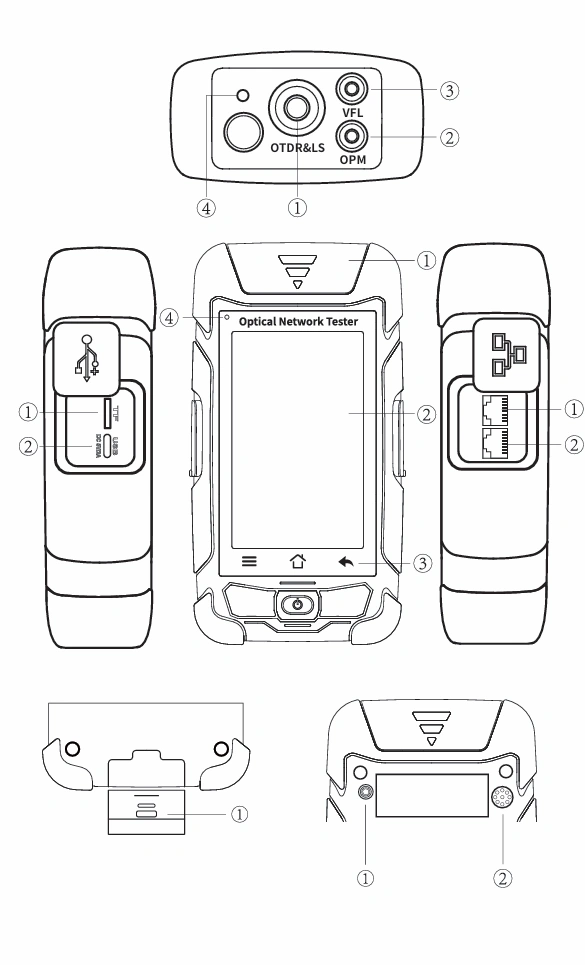
Vue de dessus Vue de face Vue de profil gauche
① Port OTDR/LS ① Cache anti-poussière ① Port pour carte TF ② Port OPM ② Écran LCD couleur de 4,3 pouces LCD couleur ② USB Type C ③ Port VFL ③ Touches de fonction ④ Port de télémétrie laser ④ Voyant LED de charge
Côté droit Vue de dessous Vue arrière
① Port RJ45 « Tracker » ① Testeur à distance RJ45 ① Lampe de poche
② Port de séquence RJ45 ② Haut-parleur
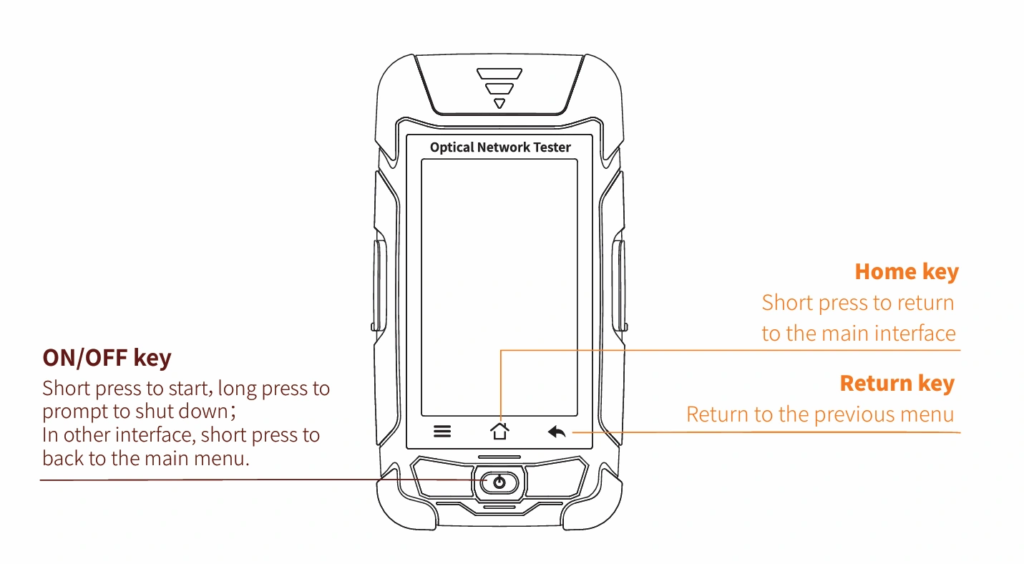
Touches de fonction
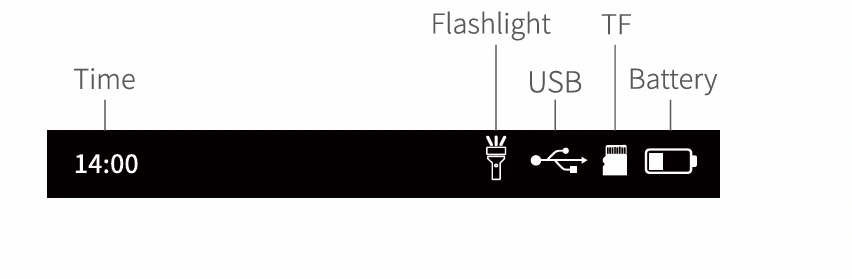
Interface principale
Allumez l'appareil, accédez au menu principal. Vous y trouverez 11 modules fonctionnels ; appuyez sur l'icône correspondante pour accéder à l'interface de la fonction souhaitée.
Auto OTDR
OTDR automatique : il suffit de régler la longueur d'onde,
Les autres paramètres sont sélectionnés automatiquement.
Réglage : saisir “ Réglage de test ” / “ Réussite/Échec ”
interface
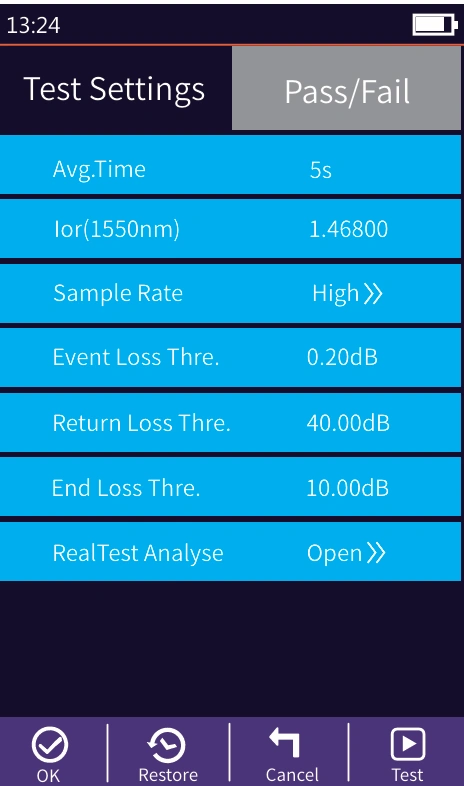
Paramètres d'essai : définir l'onde, l'IOR et la durée de l'essai
Paramètres « Réussite / Échec » :
Seuil de perte moyen : définit le seuil de la
perte moyenne de liaison
Seuil de perte d'événement : définit le seuil de perte de
événements dans le lien. S'il est supérieur à cette valeur
seuil, le résultat sera considéré comme un échec ; dans le cas contraire, il
sera adopté.
Fichier : ouvrir les données de courbe enregistrées
Enregistrer : le fichier est enregistré dans le dossier portant le nom
nom du même jour
Test : lancer le test automatique de l'OTDR
Attention
À l'exception des longueurs d'onde 1 625/1 650 nm, merci de ne pas effectuer de test en ligne !
Menu de configuration de l'OTDR
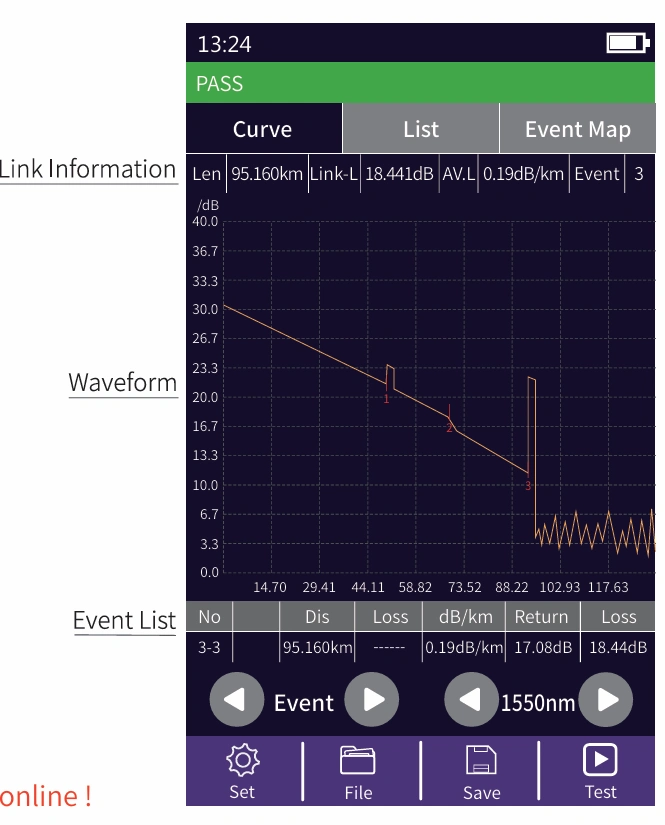
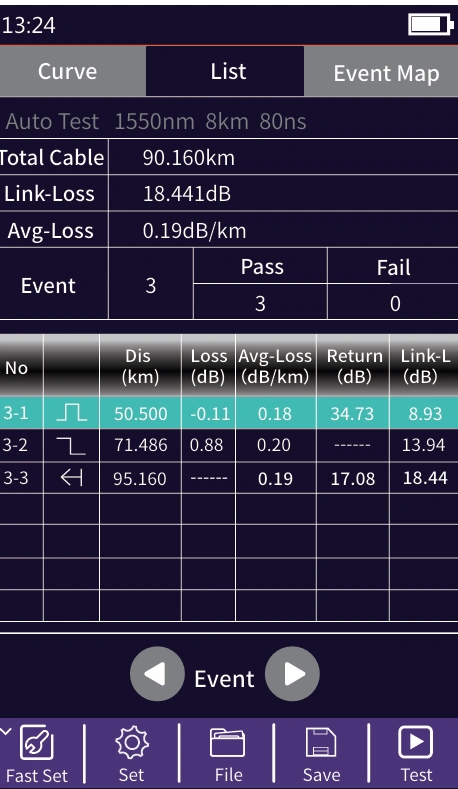
Liste : les résultats des tests s'affichent sous forme de liste.Longueur du câble : longueur totale de la liaisonPerte de liaison : perte totale de la liaisonAvg-Loss : la perte moyenne de la liaisonÉpreuve : nombre total d'épreuves, nombre de réussites, nombre d'échecsDans la liste des événements :N° : numéro de l'événement en coursType : le type de l'événement actuelDis : la distance de l'événement en coursPerte : valeur de la perte liée à l'événement en coursAvg-Loss : la valeur moyenne de la perte depuis le début jusqu'à l'événement actuelRL : valeur de la perte de retour du point d'événement actuelLink-L : la perte totale depuis le début jusqu'au point de l'événement actuel
OTDR expert
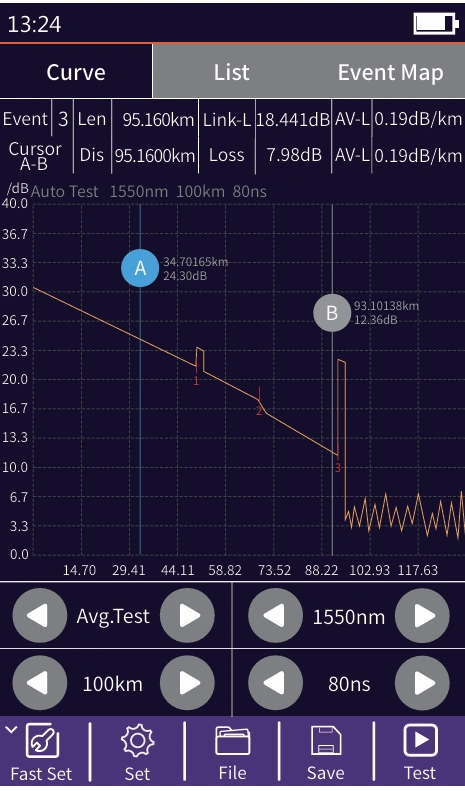
OTDR avancé : configurez des paramètres tels que la longueur d'onde, la portée et la largeur d'impulsion.
FastSet : configuration rapide des paramètres de test de l'OTDR
Mode de mesure : mode d'analyse OTDR, AutoTest/RealTest/Avg.Test
Longueur d'onde : sélectionnez la longueur d'onde d'essai de l'OTDR
Portée de test : on choisit généralement une longueur équivalente à environ deux fois celle de la fibre optique à tester
Largeur d'impulsion d'essai : 3 ns à 20 000 ns (au choix) ; selon la plage sélectionnée, la largeur d'impulsion disponible varie.
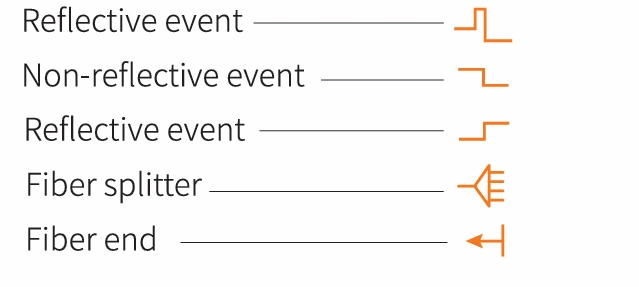
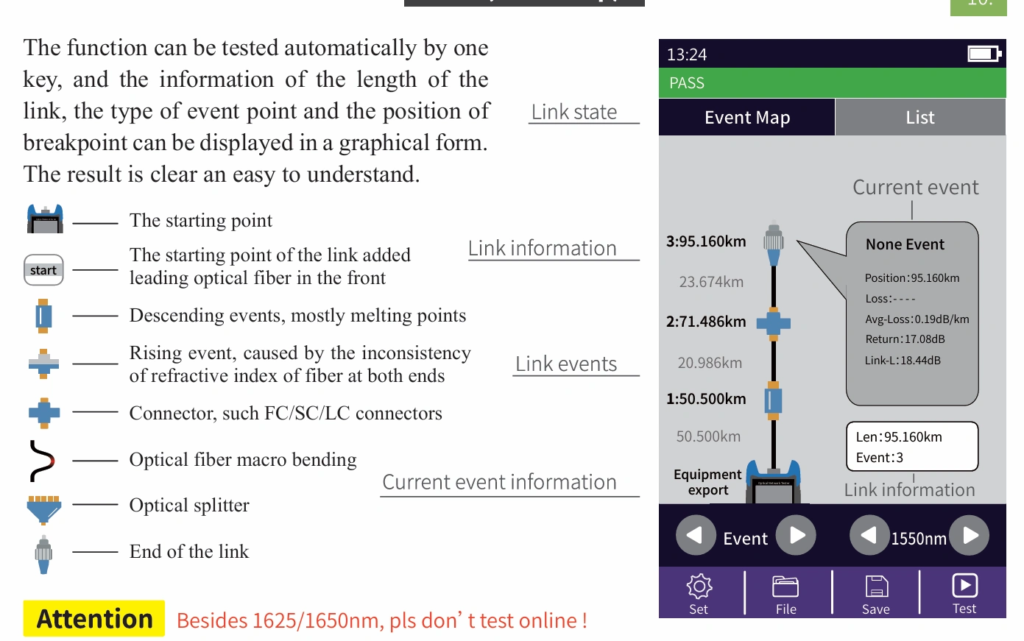
Il existe cinq types d'événements :
Réglages de l'OTDR
Paramètres : « Avg.Time » et « IOR » sont identiques à ceux du mode « Auto OTDR ». Taux d'échantillonnage : « Standard » : test avec une précision standard ; « High » : test en mode haute précision, la durée du test sera prolongée. Seuil de perte d'événement : définit le seuil de perte des points de connexion et des points de fusion de la liaison pouvant être testés, compris entre 0,2 dB et 30 dB ; la valeur par défaut est de 0,2 dB. Les valeurs de perte supérieures à la valeur définie seront répertoriées dans la liste des événements, ou seront ignorées. Seuil de perte de retour : définit le seuil de perte de retour des événements de réflexion de la liaison pouvant être testés, compris entre 10 dB et 60 dB ; la valeur par défaut est de 40 dB. Seuil de perte en extrémité : définit le seuil de perte à l'extrémité de la liaison pouvant être testé, compris entre 1 dB et 30 dB ; la valeur par défaut est de 10 dB. Analyse RealTest : active ou désactive l'analyse automatique. OK : enregistre les paramètres définis. Restaurer : rétablit les paramètres d'usine.
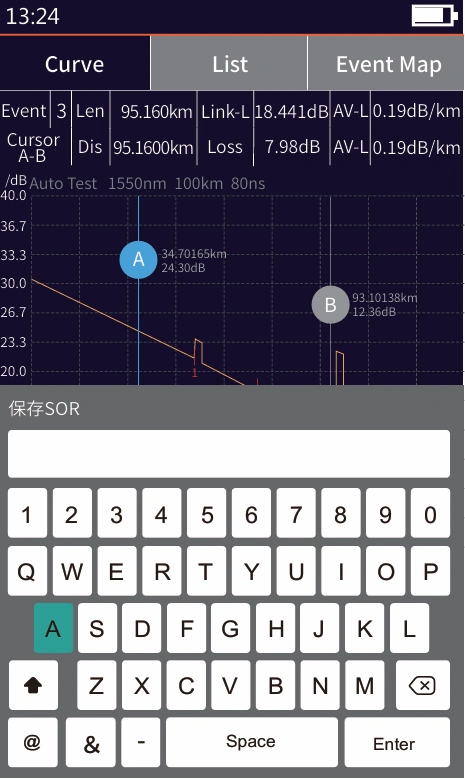
Enregistrement d'un fichier OTDR
Appuyez sur la touche 【Enregistrer】 pour enregistrer le fichier une fois le test terminé, affichez le clavier, saisissez le nom du fichier, puis appuyez sur Entrée pour enregistrer le fichier. Si la fonction d'enregistrement automatique (OTDR) est activée dans les “ Paramètres système ”, le fichier sera enregistré automatiquement à la fin du test, sans intervention manuelle.
Fonction d'enregistrement automatique
Accédez aux paramètres système, activez la fonction d'enregistrement automatique ; l'appareil enregistrera automatiquement les fichiers de test à l'issue du test moyen ou du test automatique.
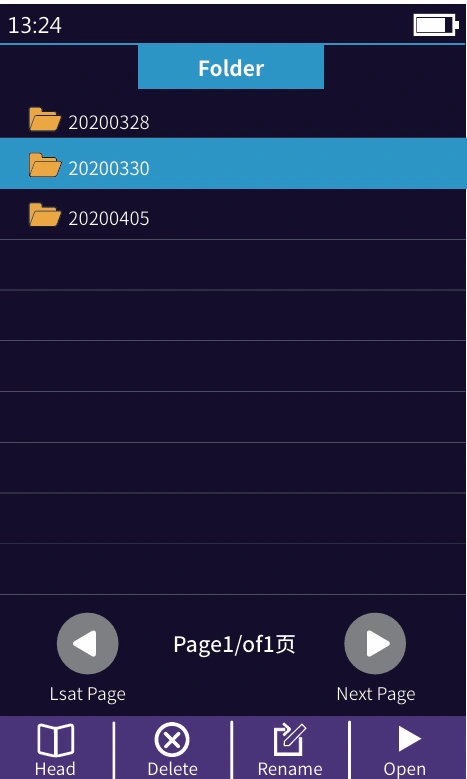
Utilisation des fichiers OTDR
Appuyez sur 【Fichier】 pour accéder à la liste des fichiers.
En-tête : retour à la première page
Supprimer : supprimer le fichier ou le dossier actuel
Renommer : modifier le nom du fichier ou du dossier actuel
Ouvrir : ouvrir le fichier ou le dossier sélectionné
iLOM (Carte des événements)
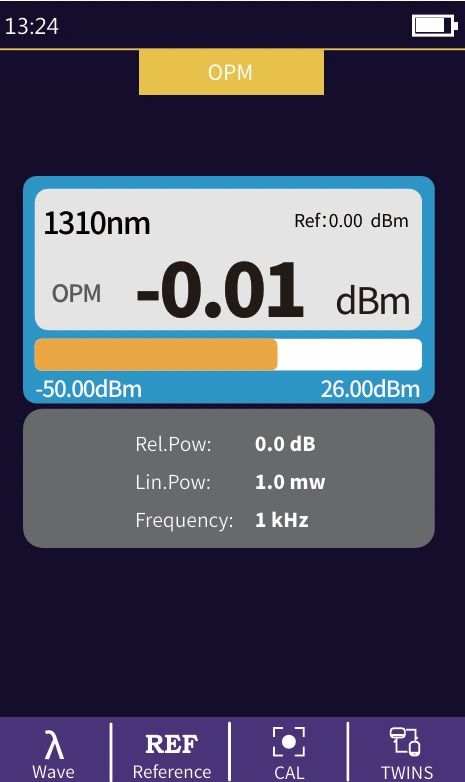
OPM
Cette fonction sert à tester la puissance du signal optique.
et la perte d'insertion de divers dispositifs et composants optoélectroniques
composants électroniques. Il permet d'identifier et de mesurer les
fréquence du signal optique : 270/330/1 000/2 000 Hz.
Onde : changer la longueur d'onde de fonctionnement
Référence : définir la puissance actuelle comme puissance de référence
CAL : passez en mode d'étalonnage utilisateur et
étalonner à l'aide de la source lumineuse de référence
TWINS : déterminer la longueur d'onde et la fréquence du
source laser testée. Cette fonction est utilisée avec les jumeaux
fonctionnement de la source laser locale : -50 à +26 dBm : puissance reçue > -10 dBm ; -70 à +6 dBm : puissance reçue > -30 dBm
La puissance absolue, la puissance relative et la puissance linéaire se convertissent comme suit : PAbs. = 10lgPLin./1 mW ; PRel. = PAbs. - PRef.
VFL
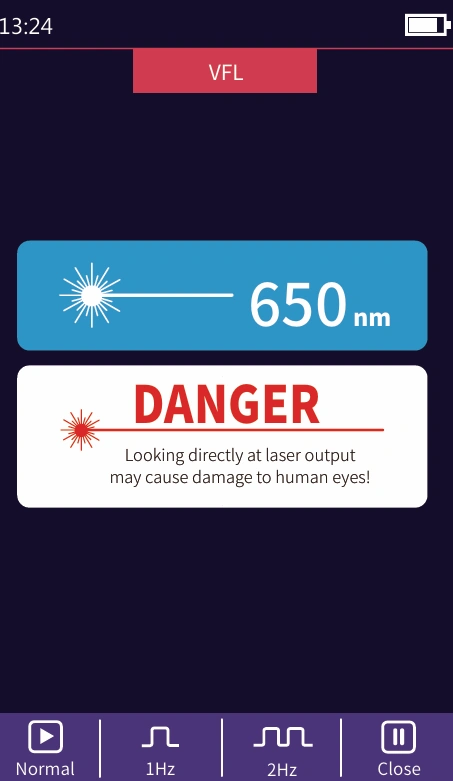
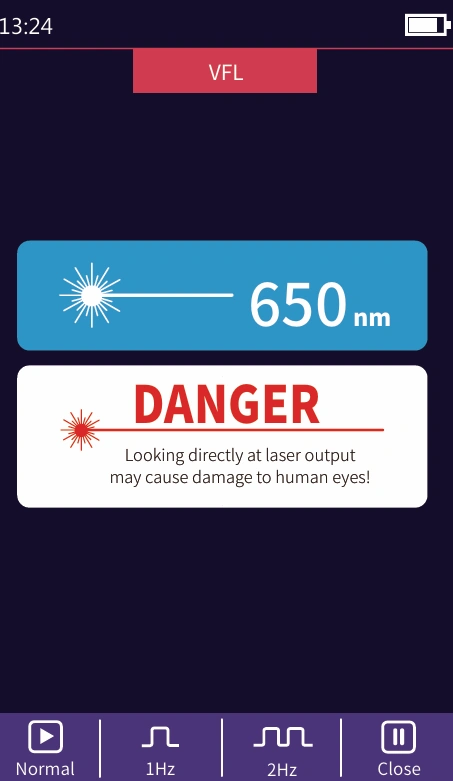
Une lumière rouge visible (650 nm) est injectée dans la fibre optique, et la position du point de défaut de la fibre optique peut être déterminée facilement et avec précision en observant l'emplacement de la fuite sur la fibre mesurée. Cet appareil est adapté à la détection des fibres optiques nues, des cavaliers et autres sections à pertes élevées causées par des défauts proches de l'extrémité et des micro-courbures des fibres optiques et des câbles pouvant entraîner une fuite de lumière rouge.
Mode normal : le voyant rouge s'allume, lumière fixe
1 Hz : la source lumineuse rouge clignote une fois par seconde
2 Hz : la source lumineuse rouge clignote deux fois en une seconde
Fermer : éteindre le voyant rouge
Avertissement
Regarder directement le faisceau laser peut endommager les yeux !
Source laser
La longueur d'onde de la source laser stabilisée est de
identique à la longueur d'onde de l'OTDR. Elle sert à
mesurer les paramètres des télécommunications-
tion, télévision par câble, câble LAN, perte d'insertion, isolation-
perte d'intensité et perte par écho des composants optiques passifs
dispositifs, et la sensibilité aux longueurs d'onde de
détecteurs.
Allumer : mettre la source laser sous tension
Onde : modifier la longueur d'onde, la sortie
la longueur d'onde correspond à celle de l'OTDR
Mode : permet de modifier la fréquence de modulation de
source lumineuse, CW/270/330/1000/2000 Hz
TWINS : passe en mode de sortie par paires. Cette commande
La fonction est utilisée avec la fonction « twins » de
Avertissement concernant le mesureur de puissance optique local
Regarder directement le faisceau laser peut endommager les yeux !
Source laser
La longueur d'onde de la source laser stabilisée est de
identique à la longueur d'onde de l'OTDR. Elle sert à
mesurer les paramètres des télécommunications-
tion, télévision par câble, câble LAN, perte d'insertion, isolation-
perte d'intensité et perte par écho des composants optiques passifs
dispositifs, et la sensibilité aux longueurs d'onde de
détecteurs.
Allumer : mettre la source laser sous tension
Onde : modifier la longueur d'onde, la sortie
la longueur d'onde correspond à celle de l'OTDR
Mode : permet de modifier la fréquence de modulation de
source lumineuse, CW/270/330/1000/2000 Hz
TWINS : passe en mode de sortie par paires. Cette commande
La fonction est utilisée avec la fonction « twins » de
Avertissement concernant le mesureur de puissance optique local
Regarder directement le faisceau laser peut endommager les yeux !
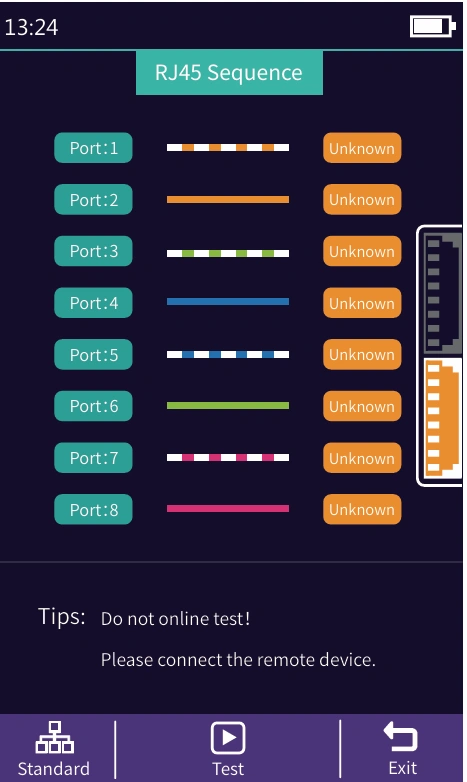
Séquence RJ45
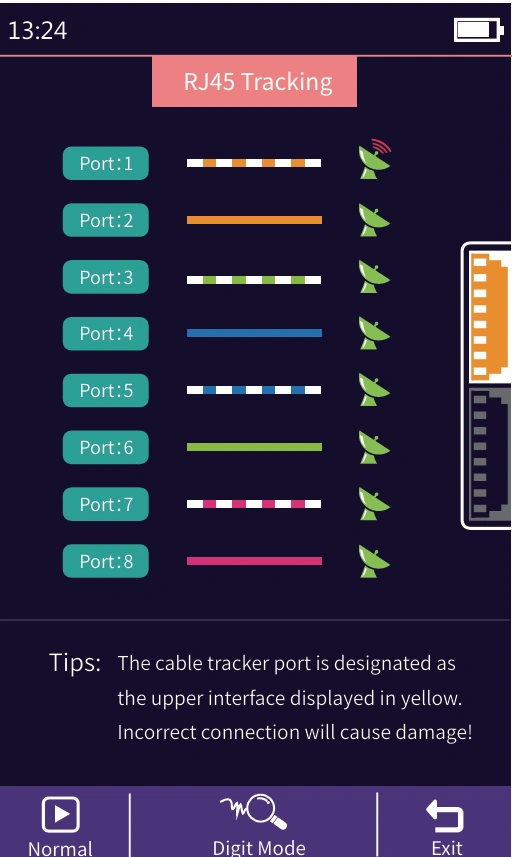
Mesure de la séquence des broches d'un connecteur RJ45.
Mesurez l'ordre des fils à 8 conducteurs à l'intérieur du câble réseau. Veuillez connecter le module distant lors de la mesure.
Norme : sélectionnez différentes normes de câbles réseau
Test : lancer le test de séquence des câbles
Quitter : quitter le test de séquence des câbles et revenir à l'interface principale
Avertissement
Merci de ne pas passer le test en ligne !
Attention
Le port de longueur de câble correspond à l'interface inférieure, indiquée en jaune. Une mauvaise connexion peut entraîner des dommages !
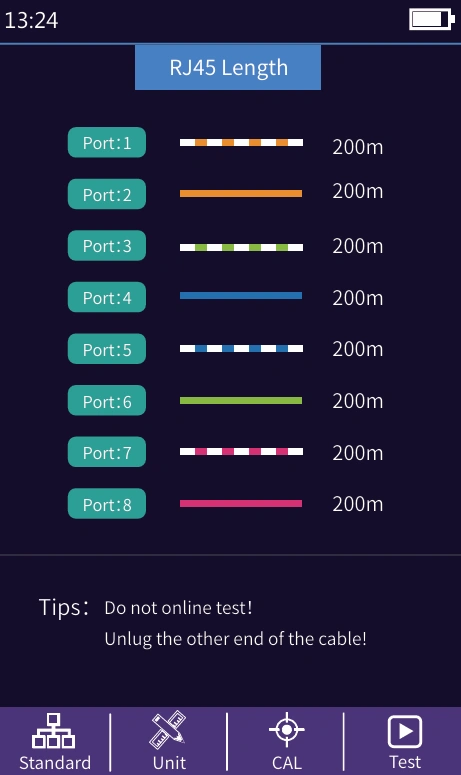
Longueur RJ45
Test de longueur RJ45 : Tester la longueur du
câble réseau.
Norme : sélectionnez différentes normes de câbles
Unité : changer d'unité
CAL : ajuster le résultat du test en fonction de la
longueur réelle et longueur affichée = dernier test
résultat × correction
Test : test de longueur du câble de démarrage
Avertissement
Merci de ne pas passer le test en ligne !
AttentionLe port de longueur de câble correspond à l'interface inférieure, indiquée en jaune. Une mauvaise connexion peut entraîner des dommages !
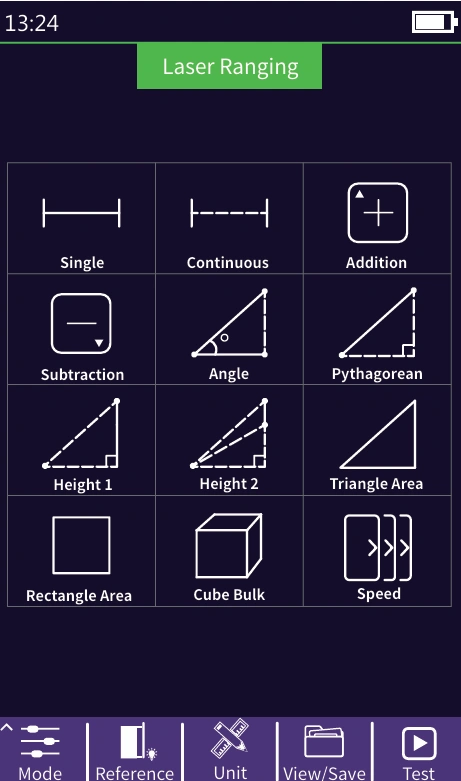
Mesure de distance par laser
Portée du laser : la distance maximale de mesure est de 40 mètres
Mode : unique / continu / addition / soustraction / An
gle/Pythagorean/Height1/Height2/Triangle
Aire/Aire rectangulaire/Volume/Mesure de la vitesse
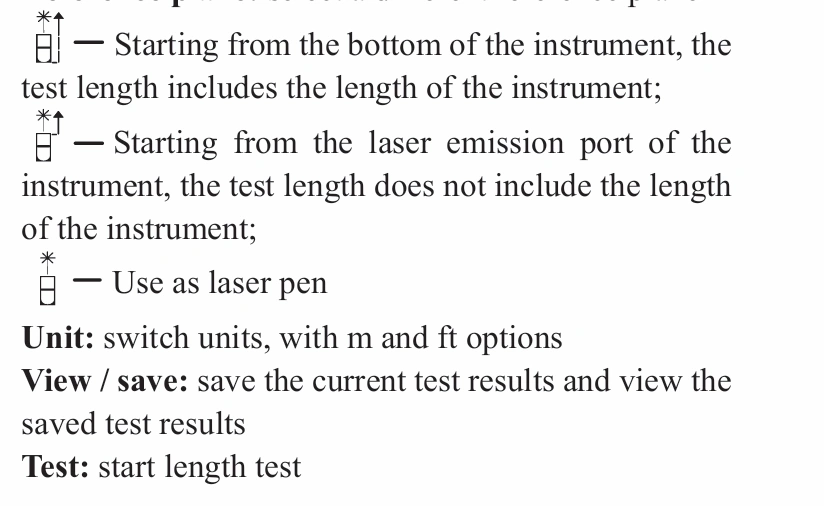
La ligne continue figurant sur l'icône du mode de mesure correspond à la
paramètre à tester
Plan de référence : sélectionnez un autre plan de référence
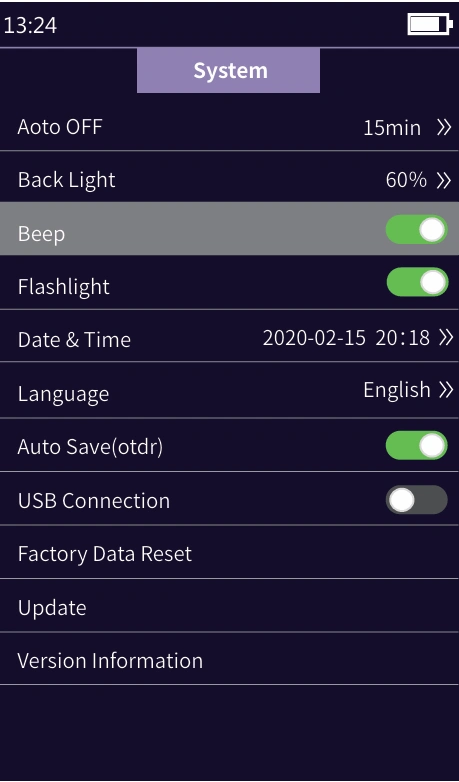
Paramètres système
Arrêt automatique : régler la durée avant l'arrêt automatique
Luminosité du rétroéclairage : Réglage de la luminosité du rétroéclairage
Son : activer ou désactiver la tonalité tactile
Lampe de poche : allumer ou éteindre la lampe de poche
Date et heure : régler la date et l'heure de l'appareil
Langue : affiche le type de langue maternelle
Enregistrement automatique : enregistrer automatiquement le fichier de courbe après
ouverture
Connexion USB : connectez-le à l'ordinateur après
données d'ouverture et de transfert
Restaurer les paramètres d'usine : rétablir les paramètres par défaut
valeurs
Mise à jour : mise à jour logicielle
Informations sur la version : afficher les informations locales et
historique des alarmes