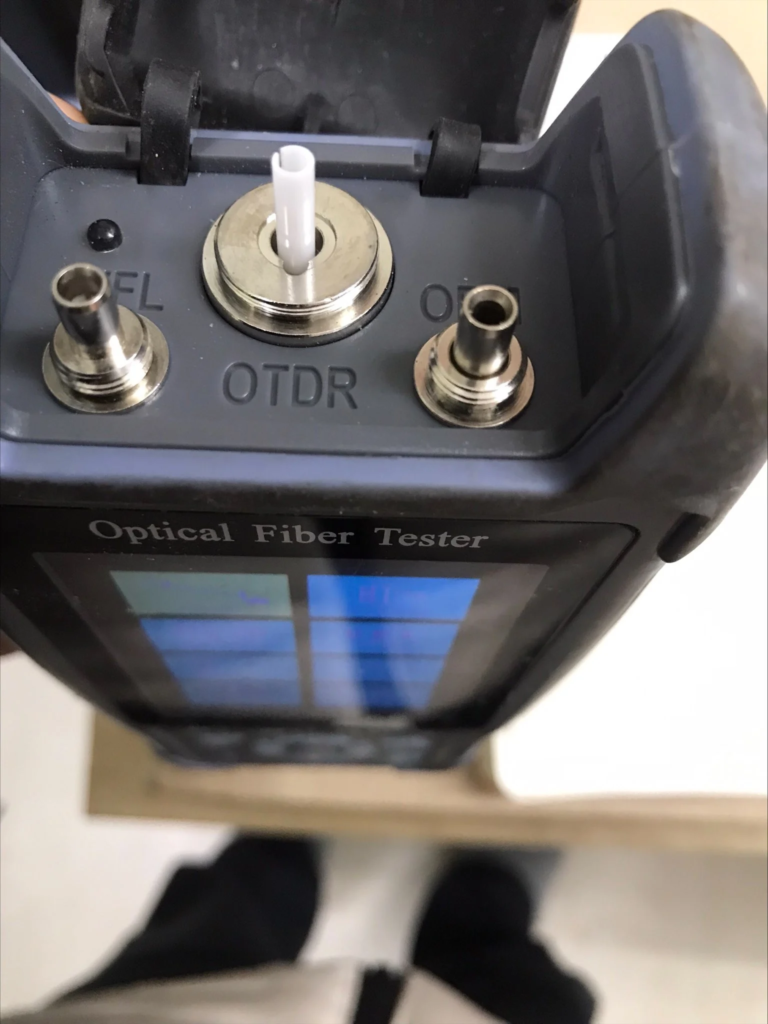
If the ceramic tube comes out while using your OTDR, the issue is with the SC connector, not the OTDR unit itself. To fix this, gently pull the detached ceramic tube from the OTDR port and carefully re-install it into the SC connector. If re-installation fails, you must purchase a replacement SC connector.
Cause of the Issue
The ceramic ferrule tube is a core component of the SC connector assembly, designed to align the fiber core. It is not a built-in part of the OTDR hardware. Detachment usually occurs due to excessive pulling force or a worn-out connector housing.
Step-by-Step Fix Guide
If you experience this detachment, follow these steps immediately:
- Remove the Tube: Gently extract the detached ceramic tube from the OTDR optical port using fine tweezers or your fingers. Do not force it.
- Inspect the Tube: Check the ceramic tube for any cracks, chips, or severe dirt.
- Re-install into SC Connector: Carefully align and push the ceramic tube back into the housing of your SC connector until it seats firmly.
- Verification: Gently tug on the tube to ensure it is secure. Reconnect it to the OTDR and run a quick test trace to confirm optical continuity.
Q: Can I permanently remove the ceramic tube for common use?
A: No. The ceramic tube is critical for precise fiber alignment. Removing it permanently will cause massive insertion loss, rendering the SC connector useless and potentially damaging the OTDR port.
Q: What if the ceramic tube cannot be securely re-installed?
A: If the housing is stripped or the tube feels loose after re-installation, the connector is permanently damaged. You must purchase a new SC connector. Standard SC connectors are widely available from various suppliers in the market.
You can also visit the FF-980REV Mini Pro OTDR specifications to find more OTDR technical information.