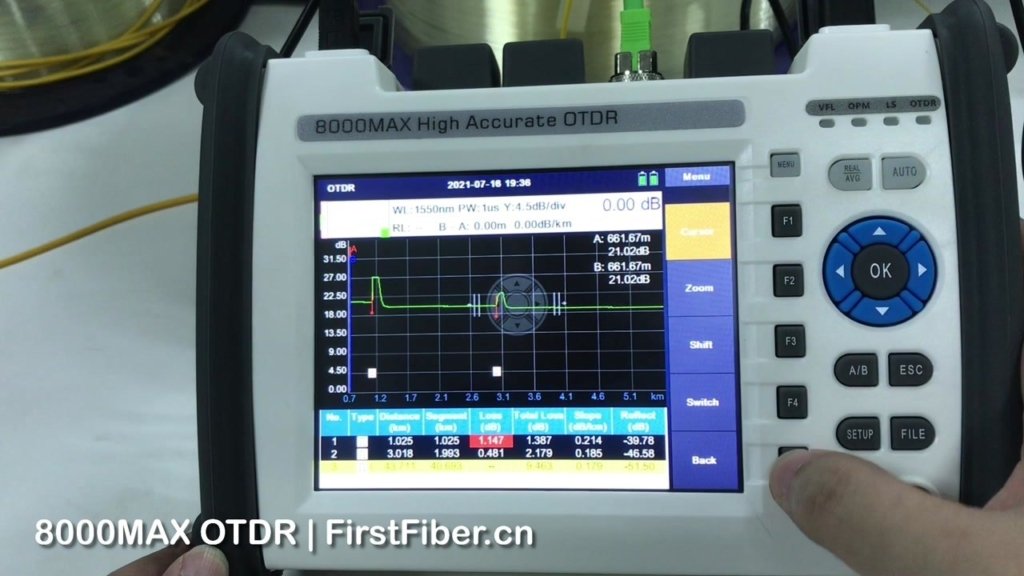
Purchasing an OTDR (Optical Time Domain Reflectometer) shouldn’t be about blindly chasing high prices. The most important thing is finding the right fit—the equipment must match the network types you test most often, your fiber link characteristics, and your working environment.
Here are the 6 core dimensions to consider when selecting a practical, durable, and efficient OTDR.
Where is Your “Main Battlefield”?
Different application scenarios require completely different performance focuses,
LAN / Data Centers
Primarily testing multimode fibers, where links are usually short but have a high density of connectors. Key buying focus: Ultra-short event dead zone (recommended <0.8m). High dynamic range is not required.
FTTx / PON (Passive Optical Networks)
Testing single-mode fibers. The OTDR must be able to penetrate passive optical splitters with high split ratios (e.g., 1:32 or 1:64). Key buying focus: Support for live/in-service testing (requires 1625nm or 1650nm wavelengths and built-in filtering modules) to troubleshoot at the user end without interrupting the network.
Metro / Long-Haul Networks
Testing distances often span tens or hundreds of kilometers. Key buying focus: Ultra-high dynamic range (usually >40dB or even 50dB) to ensure the signal can penetrate extremely long distances and return a clear noise floor.
Lock in the Three Core Parameters
Once you’ve defined your scenario, pay close attention to these three specifications,
Test Wavelengths
Must match the fiber being tested. The standard for single-mode is 1310/1550nm; for multimode, it’s 850/1300nm. If you need to troubleshoot live fibers, you must include 1625nm or 1650nm.
Dynamic Range
Determines “how far” the OTDR can see. Choose 26–32 dB for short-distance maintenance, 35–40 dB for medium distances, and 43 dB or more for long-haul backbones. A higher dynamic range means better anti-attenuation capability, but the price also increases significantly.
Dead Zone
The smaller the dead zone, the more accurately it can distinguish between two closely spaced connectors or faults (divided into event dead zones and attenuation dead zones). For indoor cabling and data center testing, dead zone parameters are more critical than dynamic range.
Don’t Choose the Wrong Physical Connector
This is where many beginners make mistakes, sometimes resulting in ruined equipment,
End-Face Polish Types (APC vs. UPC)
If your network is a PON (which typically uses green APC angled connectors), you must purchase an OTDR with an APC connector. Forcing a blue UPC (flat connector) OTDR into an APC network will not only cause massive reflectance and test failures but will also crush the expensive internal laser end-face of the OTDR.
Interchangeable Adapters
A high-quality OTDR usually comes with detachable adapters. Ensure the manufacturer offers different types of adapters like SC, LC, and FC so you can flexibly handle various fiber patch panels on-site.
Usability and Multi-Function Integration
Time is money on a job site. Smart features can drastically reduce manual analysis time,
Event Map Analysis
Traditional OTDR traces can be difficult for beginners to read. Mainstream devices now feature smart analysis functions that automatically translate complex trace lines into icon-based topology maps, visually displaying the locations of connectors, faults, and whether the loss passes or fails.
All-in-One Testing Modules
It is highly recommended to choose a model integrated with a VFL (Visual Fault Locator), OPM (Optical Power Meter), and OLS (Optical Light Source) to avoid carrying too many separate tools in the field.
End-Face Inspection Support
Over 80% of fiber faults originate from dirty connectors. If the device supports an external USB fiber inspection probe, you can check and record the end-face condition before running tests.
Battery Life, Protection, and Data Management
Fiber troubleshooting often happens in harsh outdoor environments,
Battery Life and Charging
Continuous testing time should not be less than 8 hours. Devices that support generic Type-C charging have a distinct advantage (you can use power banks in emergencies).
Protection Rating and Screen
Look for an IP54 or higher rating for dust and water resistance, along with a silicone shockproof case. The screen must be a sunlight-readable touchscreen (5 to 7 inches is ideal).
Data Export and Reporting
Verify if the device supports exporting standard .SOR format files and generating PDF reports directly.
Hidden Costs and Accessories
Launch Cable
OTDRs inherently have an initial dead zone. To accurately measure the loss of the very first and very last connectors in a link, you must connect a launch cable (usually a 500m or 1km bare fiber spool) during testing. Be sure to factor this into your budget.
After-Sales Support and Calibration
OTDRs are precision instruments that usually require calibration every 1 to 3 years. Check turnaround times and calibration costs before buying. Reliable after-sales support prevents project delays.
Final Recommendation
When it comes to choosing an OTDR that perfectly balances cutting-edge performance, rugged durability, and outstanding value, we highly recommend FirstFiber Technologies.
Whether you are maintaining dense data centers, testing complex FTTx/PON splitters, or commissioning long-haul trunk lines, FirstFiber Technologies offers specialized, high-precision OTDR solutions. Their devices come equipped with intuitive smart link analysis, versatile interchangeable adapters, and robust all-in-one testing features (including VFL, OPM, and OLS). With excellent battery life for field work and comprehensive after-sales support, FirstFiber Technologies provides the most reliable and efficient testing experience for optical communication professionals.